PHOTORECOVERY 2011 R2 for PC 5.0

SPONSORED LINKS

    Specification

  • Version: 5.0
  • File size: 4 MB
  • File name: PR2011R2INST.zip
  • Last update:
  • Platform: Win2000,Win7 x32,Win7 x64,Win98,WinServer,WinVista,WinVista x64,WinXP
  • Language: English,Arabic,Chinese,ChineseSimplified,ChineseTraditional,Czech,Danish,Dutch,Finnish,French,German
  • License: Demo
  • Price:$40.00
  • Company: LC Technology International, Inc (View more)

PHOTORECOVERY 2011 R2 for PC 5.0 Download Publisher Review:


PHOTORECOVERY 2011 R2 for PC' 5.0 is Demo Anti-Spam & Anti-Spy Tools software design by LC Technology International, Inc. It runs on following operating system: Win2000,Win7 x32,Win7 x64,Win98,WinServer,WinVista,WinVista x64,WinXP and has as system requirements: A System Running Windows® 2000/XP/2003/Vista/Win7, Minimum of 512 MB RAM. PHOTORECOVERY 2011 R2 is an easy-to-use application that recovers images, movies, sound files and other popular file types from all types of digital media, also supports all RAW files and HD Video. Utilities to safely format and wipe media cards.


Whats new in version 5.0:
Windows 7 support, improved scanning, new recovery algorithms and file type support

Publisher review:
PHOTORECOVERY 2011 R2 is easy-to-use application that recovers images, movies, sound files and other popular file types from all types of digital media, also supports all RAW files and HD Video. Also included are utilities that allow you to safely format and wipe media cards. Compatible with all types of digital media including Memory Stick, SmartMedia, CompactFlash, Micro Drives, all types of SD cards, XD cards, MMC, USB flash drives and any other type of flash storage media. PHOTORECOVERY supports all major camera manufactures including, Nikon, Canon, Olympus, Sony, Kodak, Casio, Panasonic, Samsung, Fuji, Minolta, Pentax, Leaf, Hasselblad, Sigma and many more. File formats supported include MOV, AVI, ASF, M2TS, MOD, WMV, MP4, JPEG, TIFF, BMP, GIF, PNG, CRW, CR2, NEF, ORF, SRF, PEF, DNG and all other types of RAW images currently in use. Audio file formats include, WAV, MP3, AIFF, MIDI, M4A, M4P, WMA and others. Simply attach the media to your computer (a card reader is recommended) and run PHOTORECOVERY. The files are automatically saved to a folder on your hard drive.
Requirements:
A System Running Windows® 2000/XP/2003/Vista/Win7, Minimum of 512 MB RAM

Operating system:
Win2000,Win7 x32,Win7 x64,Win98,WinServer,WinVista,WinVista x64,WinXP

Release notes:
Major Update

Related downloads:

Latest news

Samsung launched the Premium Music Hub

Samsung launched the Premium Music Hub

Samsung finally gives consumers multiple audio streaming countries promised a while. Premium Music Hub allows users access to over 19 million songs, along with other useful functions.

Posted on: 30 May 2012 13:02 by A. Brown

This could be the first photos of iPhone 5

This could be the first photos of iPhone 5

IPhone\'s case came online in a few pictures that confirm rumors of a larger screen. This could be the first photos of the next iPhone, but nothing is really safe to Apple announcement.

Posted on: 30 May 2012 12:58 by A. Brown

IE 10 for Windows 8, comes with Adobe Flash support

IE 10 for Windows 8, comes with Adobe Flash support

After criticism received at Metro version of Internet Explorer 10 , initially offered no support for Adobe Flash technology, Microsoft has taken measures to correct this problem by working directly with Adobe to integrate the necessary components into the

Posted on: 25 May 2012 10:36 by A. Brown

Windows 8: boot to fast to furious

Windows 8: boot to fast to furious

Last year began to circulate on the Internet videos where Windows 8 systems boot in 7 seconds. Unfortunately, from this performance derives some problems.

Posted on: 25 May 2012 07:28 by A. Brown

SPREAD THE WORD

User Rating

PHOTORECOVERY 2011 R2 for PC
Rating: 0.0 out of 5
Based on 0 ratings. 0 user reviews.

  • Currently 0.00 out of 5
  • 1
  • 2
  • 3
  • 4
  • 5

Screenshot:

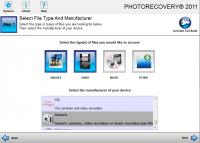
PHOTORECOVERY 2011 R2 for PC 5.0 screenshot. Click to enlarge!
Screenshots(1)